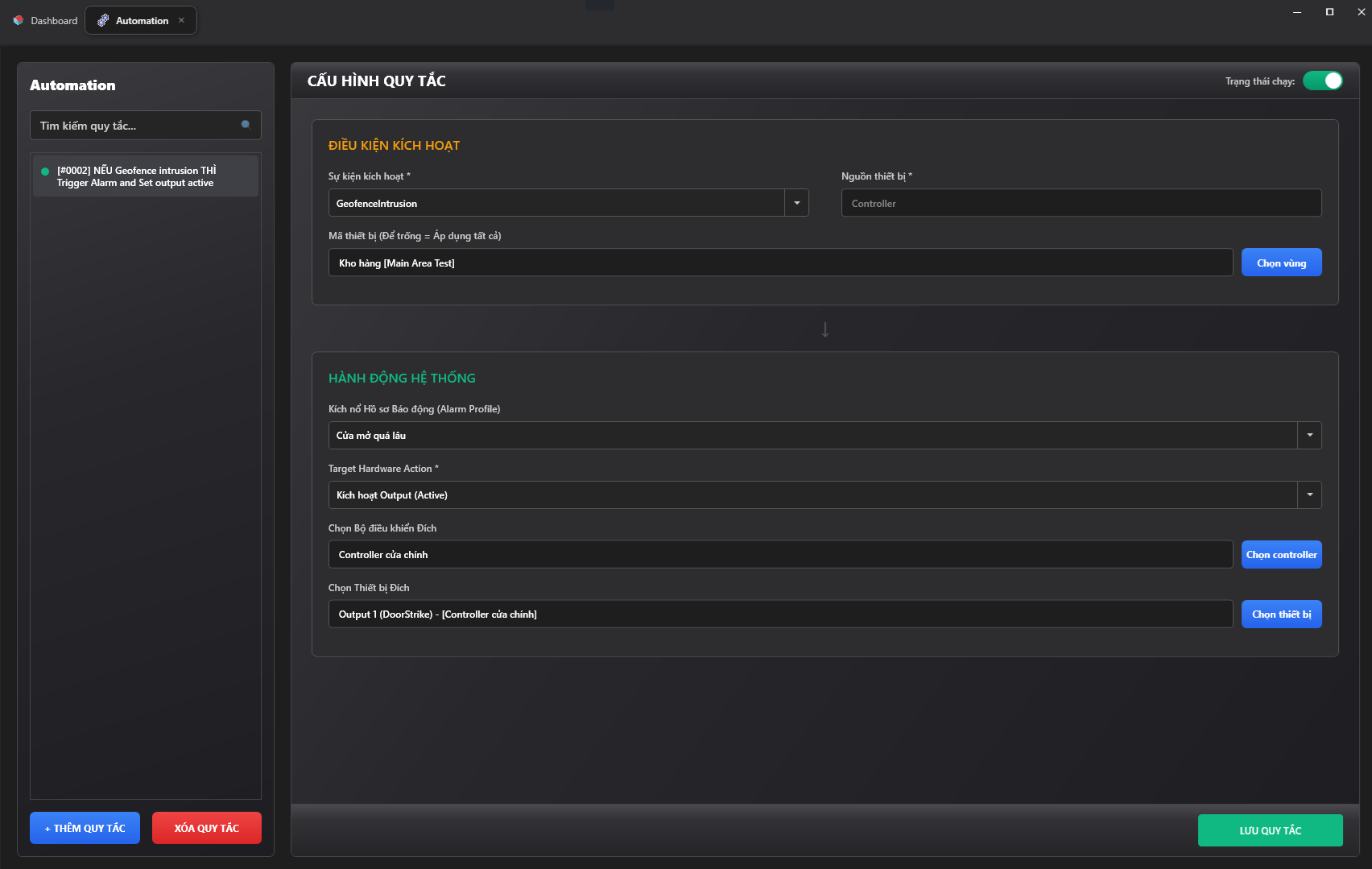
Automation Management
The Automation module allows you to configure logic rules using an IF-THEN structure. This feature detects input events to automatically execute hardware actions or trigger the corresponding alarms.
1. Rule List
The left-side column displays all automation rules currently configured in the system:
- Search: Enter a keyword to filter rules by name.
- Add Rule / Delete Rule: Create a new rule or remove an existing one.
- The colored dot next to each rule name indicates its status (Green: Active, Gray: Paused).
2. Rule Configuration: Trigger Condition (IF)
This section defines the input event that serves as the trigger for the rule:
- Trigger Event (*): Select the event type from the dropdown list (e.g., GeofenceIntrusion, Door held open too long, Network connection lost).
- Device Source (*): Select the type of device that generates the event (e.g., Controller, Reader).
- Device Code / Zone: Select a specific device or zone to apply this condition to (e.g., Warehouse [Main Area Test]). If left blank, the rule will apply to all devices in the system.
3. Rule Configuration: System Action (THEN)
This section defines the system tasks that will be automatically executed when the trigger condition above is met:
- Trigger Alarm Profile: Links directly to the Alarm module. Select a pre-configured alarm scenario (e.g., Door held open too long) for the system to display a warning on the duty screen and prompt the execution of the SOP.
- Target Hardware Action: Select the hardware command to execute (e.g., Activate Output, Unlock all doors).
- Select Target Controller: Specify which controller will receive the command.
- Select Target Device: Specify which Output/Input port on that controller will execute the command (e.g., Output 1 (DoorStrike) - Main Entrance Controller).
4. Activating and Saving
- Running Status: Located in the top-right corner. Toggle this switch (blue) to apply the rule in production, or turn it off to temporarily disable it without deleting it.
- Click the Save Rule button (green) at the bottom to have the system record and push the command down to the hardware devices.