Audit trail
The Audit Trail module enables administrators to monitor, search, and trace the complete history of actions affecting S-Safe system data or configurations (such as adding, editing, or deleting controllers, users, access schedules, etc.).
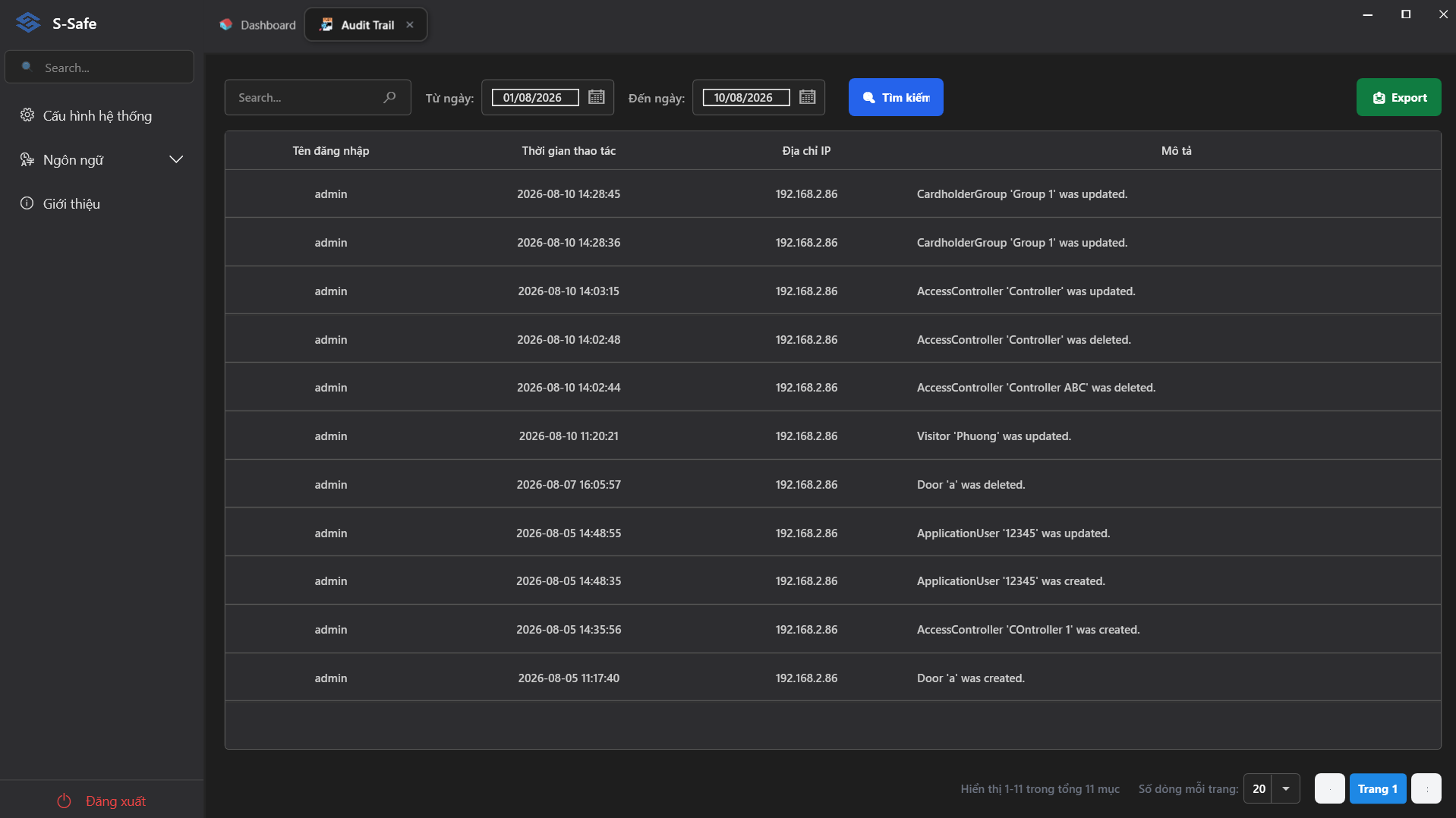
1. Toolbar & Search Filters
The system provides filters to help you quickly narrow down the data you wish to view:
- Search Box (
Search...): Enter keywords related to usernames, IP addresses, or action descriptions to perform a quick filter. - Time Range Filters:
- From Date: Select the query start date (e.g.,
01/08/2026). - To Date: Select the query end date (e.g.,
10/08/2026).
- From Date: Select the query start date (e.g.,
- Search Button (Blue): Click to have the system apply filters and display the corresponding list of results.
- Export Button (Green): Click to export the currently displayed list of action logs to a data file for archiving or reporting purposes.
2. Audit Log Data Table
The detailed table includes the following information columns:
- Username: The administrator or user account performing the action (e.g.,
admin). - Action Time: The exact timestamp when the action was recorded (Format:
YYYY-MM-DD HH:mm:ss, e.g.,2026-08-10 14:28:45). - IP Address: The IP address of the computer/device used to perform the action (e.g.,
192.168.2.86). - Description: Details of the action performed on the system, for example:
- CardholderGroup: Cardholder group (e.g.,
CardholderGroup 'Group 1' was updated.). - AccessController: Access controller (e.g.,
AccessController 'Controller' was created/updated/deleted.). - Visitor: Visitor information (e.g.,
Visitor 'Phuong' was updated.). - Door: Access door (e.g.,
Door 'a' was created/deleted.). - ApplicationUser: Application user account (e.g.,
ApplicationUser '12345' was created/updated.).
- CardholderGroup: Cardholder group (e.g.,
3. Navigation & Pagination
The area at the bottom of the screen manages data display:
- Total Statistics: Displays the total number of records matching the filter (e.g., Showing 1-11 of 11 items).
- Rows per Page: Allows selecting the number of records displayed per page (Default:
20). - Pagination Bar: Select a specific page (
Page 1,Page 2, etc.) or navigate between pages in the list.