Cardholder Group Management
The Cardholder Groups module allows administrators to cluster personnel with similar roles or from the same department (e.g., Technical Group, Accounting Group, Visitors). Managing access by group significantly reduces the time needed to configure door permissions, eliminating the need to manually configure each individual separately.
1. Main List Interface
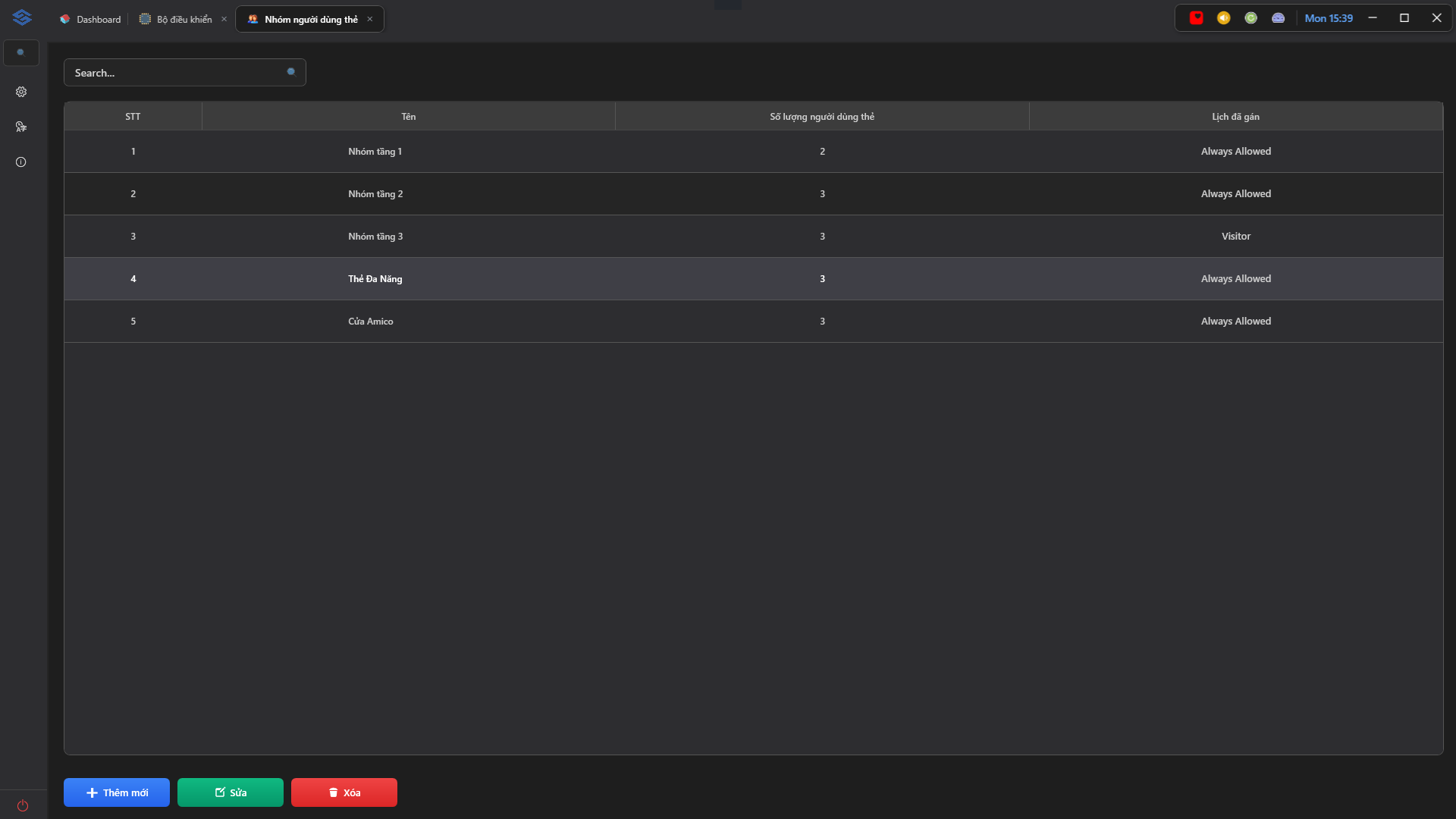
The screen displays a list of all existing cardholder groups in a clear data table with the following main columns:
- No.: The sequential order number of the group.
- Name: The identifying name of the cardholder group (e.g., Floor 1 Group, Multi-purpose Card, Amico Door).
- Number of Cardholders: The total number of personnel assigned to this group. Use this column to quickly check headcount changes for each group.
- Assigned Schedule: Displays the time schedules currently applied to the group (e.g., Always Allowed, Visitor).
At the bottom is a toolbar containing the primary action buttons: Add New ➕ (Blue), Edit 📝 (Green), and Delete 🗑️ (Red).
2. Adding and Configuring Group Members
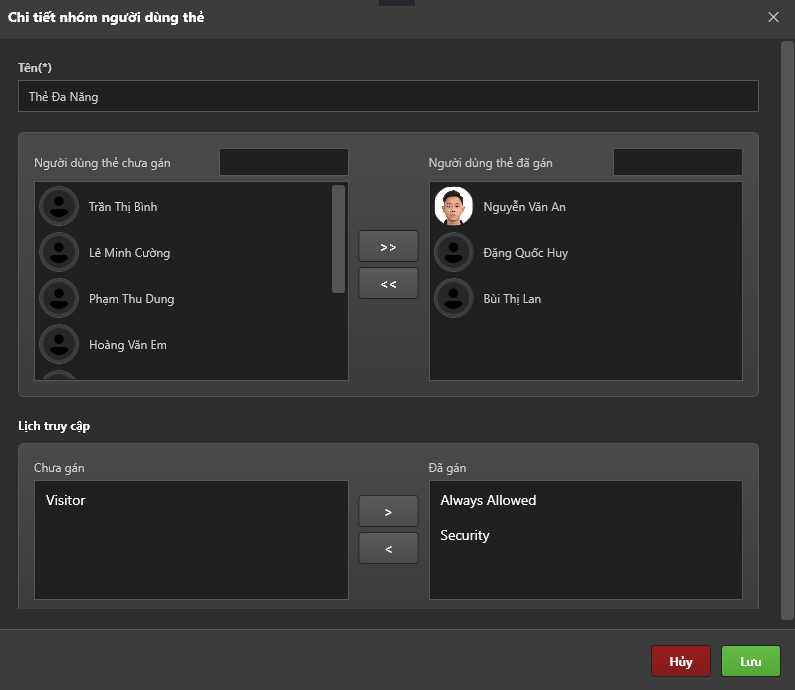
When you select a group and click the Edit 📝 button (or + Add New ➕), the Cardholder Group Details dialog will appear. The interface is streamlined for fast operation:
-
Input Field:
Name (*)is the only text field you need to fill in to identify the group (required). -
Cardholder Assignment Area: Divided into 2 corresponding list columns below:
- Unassigned Cardholders (Left): Displays all personnel currently in the S-Safe system who have not yet been added to this group (includes a quick search bar).
- Assigned Cardholders (Right): The list of personnel who are official members of this group (visually displayed with profile pictures).
- Quick Navigation: Use the
>>button to add personnel to the group, and<<to remove them.
-
Access Schedule Allocation Area:
- Unassigned (Left): Displays a list of available schedules (e.g., Visitor).
- Assigned (Right): Schedules currently applied to the group (e.g., Always Allowed, Security).
- Quick Navigation: Use the
>button to assign a schedule and<to unassign it.
Click Save (Green) in the bottom right corner to finalize the configuration. The system will automatically sync the updated member list and access schedules.
3. Editing and Deleting Groups
- Edit: Allows you to rename the group, or add/remove members and access schedules.
- Delete: Permanently removes the group from the system using the red Delete button.
When you delete a Cardholder Group, S-Safe only removes the logical object "Group Name." All personnel records inside that group WILL NOT be deleted. They will be automatically returned to an unassigned state so you can easily reassign them to other groups.