Alarm Management
The Alarms module is where you define security risks, classify their severity levels, and establish Standard Operating Procedures (SOPs) for on-duty personnel to follow when an incident occurs (e.g., Door held open too long, Forced door open, Fire, etc.).
1. The Alarm - Automation - Warning Matrix
In the S-Safe system, Alarms do not operate independently — they form a central link in a 3-step security response chain:
- Automation (Trigger / Logic): The "Brain" that detects incidents. Automation contains IF-THEN logic rules. Example: IF a forced door open is detected, THEN trigger the "Forced Open" Alarm.
- Alarm (Incident Definition / Response): The "Heart" of the event. This module defines how dangerous the incident is (Level 1/2/3) and specifies the steps security personnel must follow (SOP) to resolve it when it appears on screen.
- Warning (Notification / Broadcast): The system's "Loudspeaker." It takes information from the Alarm to send outbound notifications (Email to the Director, mobile Push notification, SMS, etc.).
2. Alarm List Interface
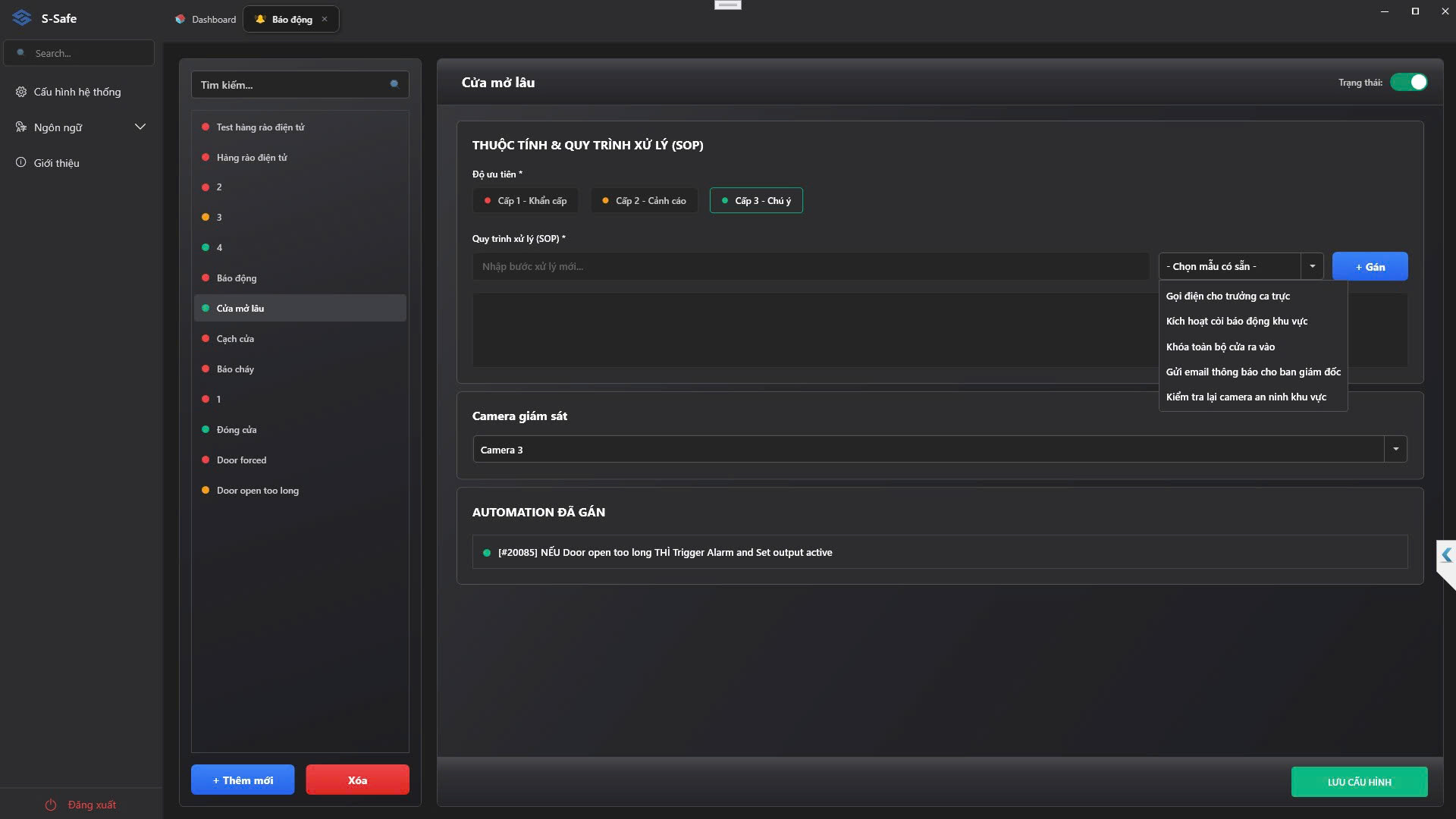
The left-side column of the module displays a list of all alarm scenarios configured in the system.
- Search Box: Quickly look up an alarm by name.
- + Add New / Delete: Create a new alarm scenario or remove ones no longer in use.
- Each alarm has a color-coded dot indicating its severity level.
3. Alarm and SOP Detailed Configuration
When you click on an alarm (e.g., Door held open too long), the right panel displays its configuration parameters:
Status
The Active/Inactive toggle switch in the top-right corner allows you to enable or temporarily suspend this alarm scenario across the entire system.
Properties & Standard Operating Procedure (SOP)
This is where the incident response protocol for security personnel is configured:
- Priority: Classifies the severity of the event so the system can sort and display it accordingly:
- Level 1 – Critical (Red): Requires immediate action (Forced door open, Fire).
- Level 2 – Warning (Orange): Requires prompt attention (Door held open too long).
- Level 3 – Notice (Green): Requires monitoring (Secondary device disconnected).
- Standard Operating Procedure (SOP): You can manually type each step of the instructions, or click Select Preset Template to quickly add standard procedures (e.g., Call the shift supervisor, Lock all entry/exit doors, Check camera footage...). These steps will be displayed on the guard's screen as a checklist to follow when an incident occurs.
Surveillance Cameras
You can select cameras connected to the system to monitor the situation during an incident. The selected camera will automatically appear on the screen when an alarm is triggered.
Assigned Automations
This section lists all Automation Rules currently linked to "trigger" this alarm. You can review this section to identify exactly which hardware or sensor is being used to monitor the incident (e.g., [#0002] IF Geofence intrusion THEN Trigger Alarm...).